Archive for the ‘general’ Category

Test Your Might!

November 30, 2008

“We will encourage you to develop the three great virtues of a programmer: laziness, impatience, and hubris.” — Larry Wall

Good programmers are like Judo masters — they both practice the art of maximizing efficiency.

Larry Wall (the founder of Perl) defined laziness as:

The quality that makes you go to great effort to reduce overall energy expenditure. It makes you write labor-saving programs that other people will find useful, and document what you wrote so you don’t have to answer so many questions about it. Hence, the first great virtue of a programmer.”

He’s not talking about programmers with bad work ethic here. No, he’s talking about expert programmers who know how to make every keystroke count.

From Wikipedia’s article on Judo:

“The word “judo” shares the same root ideogram as “jujutsu”: “jū” (柔, “jū”?), which may mean “gentleness”, “softness”, “suppleness”, and even “easy”, depending on its context. Such attempts to translate jū are deceptive, however. The use of jū in each of these words is an explicit reference to the martial arts principle of the “soft method” (柔法, jūhō?). The soft method is characterized by the indirect application of force to defeat an opponent. More specifically, it is the principle of using one’s opponent’s strength against him and adapting well to changing circumstances. For example, if the attacker was to push against his opponent he would find his opponent stepping to the side and allowing his momentum (often with the aid of a foot to trip him up) to throw him forwards (the inverse being true for pulling.) Kano saw jujutsu as a disconnected bag of tricks, and sought to unify it according to a principle, which he found in the notion of “maximum efficiency”. Jujutsu techniques that relied solely on superior strength were discarded or adapted in favour of those that involved redirecting the opponent’s force, off-balancing the opponent, or making use of superior leverage.

Master software developers have a strong command over their tools. One of the most important tips from The Pragmatic Programmer is to Use a Single Editor Well:

“The editor should be an extension of your hand; make sure your editor is configurable, extensible, and programmable.”

They’re also fluent in multiple programming languages and understand how to choose the best one for the job. When more than one language may be appropriate, they choose the most expressive language available.

Consider The FizzBuzz Problem (a simple “weed-out” problem given to interview candidates) which has been stated as:

Write a program that prints the numbers from 1 to 100. But for multiples of three print “Fizz” instead of the number and for the multiples of five print “Buzz”. For numbers which are multiples of both three and five print “FizzBuzz”.

There are many general purpose programming languages that could be used to solve this problem. Programmers have invented a game called Code Golf. The rules are simple — solve a problem with the shortest possible program.

Here’s a list of scores which demonstrates how various languages stack up to solve the FizzBuzz problem. We see Ruby and Python coming in at 56 characters each. Compare that with C# (123) and Java (130) and you start to get the idea here. If you were the policy carrier responsible for insuring these programmers against carpal-tunnel syndrome, who would you rather cover?

Book Report: Don’t Make Me Think

November 29, 2008

This book’s fitting subtitle is “a common sense approach to web usability“. Steve Krug has done a fine job of presenting his expert-level experience with making good websites better. The book is a very easy read that is chock full of useful information.

I have often visited a website or reviewed a proposal from a designer and get the feeling that the design is inadequate — but until I read this book I didn’t have the tools to identify and outline specific problems in web design. In the first few chapters the author describes a test for recognizing issues with areas such as: presentation, layout, navigation, search, and site identification.

One of the fundamental takeaways from this book is that your website should be a “Mensch” — a Yiddish term which roughly translates to “a stand-up guy”. Make things easy on your users. Don’t ask them to fill out information in forms until that information is absolutely needed. Make your website accessible to users with disabilities. The book follows it’s own advice and is written in a very friendly and down-to-earth language. It is illustrated with comical illustrations and great quotes throughout.

The last few chapters describe the benefits of conducting usability testing on your website. It calls for testing early and often, and it outlines a plan for doing it without destroying your budget.

Krug offers the book and hands-on training workshops at his company’s website, Advanced Common Sense. See for yourself, the entire text of Chapter 2 is available online. If you build websites by vocation or avocation, I highly recommend you do yourself a favor and get yourself a copy of this book.

P.S. BTW, in keeping with the spirit of this site (that is, growing a community of people sharing ideas for building better software) I’m not linking to this book with any sort of affiliate code, nor will I ever do this in the future. That’s just annoying.

Blueprints: How to Build an Army of Killer Robots

November 19, 2008

With my “blueprints” posts, I’d like to share recipes for building better software. In this first installment my goal is to introduce you to a continuous integration environment by walking you through the steps to set up your own. While following along, use your best judgement in deviating from the tutorial. For example, if you’re using another language besides Ruby in your project you might want to seek out and incorporate the preferred unit-test framework for that language (although Cucumber can also be used to test .NET, Java and ActionScript/Flex code). This exercise takes about 30 minutes to run through.

The players:

Hudson – An extensible continuous integration engine
Git – Fast version control system
Gitosis – Easier and safer repository hosting
Merb – Lean and mean Ruby web app framework
Cucumber – Execute feature documentation (stories) in plain text

The Setup:

Fresh Ubuntu 8.10 server install. I’m running mine on Amazon’s EC2 using Alestic’s public ami-7806e211, but you should be just fine following with a local server if you’re not on the cloud yet.

Step 0: Pre-installation

It’s a good idea to update our packages before getting started:

apt-get -y update && apt-get -y upgrade

Step 1: Install Java, Apache and Tomcat

Hudson is a Java web application that plays nicely with Apache 2.2 and Tomcat 6. First we’ll install Java, here’s how to get it going:

apt-get -y install sun-java6-jdk

You’ll have to accept Sun’s license agreement during the Java install, but it’s pretty painless.

Then we can just:

apt-get -y install apache2 tomcat6

If you try to install all three packages at the same time, tomcat may not start properly. YMMV.

Step 2: Convince Tomcat that it wants to run behind Apache, and prepare it for Hudson

Now we need to configure Apache and Tomcat to communicate with each other over Apache’s binary AJP protocol. We also need to prepare Tomcat for our Hudson install. This is pretty boring and labor-intensive stuff, so instead of walking you through the specifics, I’m going to just publish my config files and have you use wget to overwrite yours with them. If you want to see what I’ve modified then you can always backup your copies and diff them against mine.

wget http://pastie.org/pastes/315473/download -O /etc/tomcat6/context.xml
wget http://pastie.org/pastes/315475/download -O /etc/default/tomcat6
wget http://pastie.org/pastes/316125/download -O /etc/apache2/apache2.conf
wget http://pastie.org/pastes/318217/download -O /etc/init.d/tomcat6

Now let’s create a directory for hudson to live in and restart Tomcat.

mkdir /srv/hudson
chown tomcat6.tomcat6 /srv/hudson
/etc/init.d/tomcat6 restart
/etc/init.d/apache2 restart

Step 3: Install Hudson

This step is pretty painless, we just grab the latest version of Hudson and move it to Tomcat’s web app directory.

wget http://hudson.gotdns.com/latest/hudson.war
chown tomcat6.tomcat6 hudson.war
mv hudson.war /var/lib/tomcat6/webapps/

Don’t worry, Tomcat will load it and set it up automatically. At this point you should be able to access Hudson’s control panel. Aim your browser at http://yourhost/hudson/ and have a look around.

Step 4: Install Git and Gitosis

The Git version control system seems to be the hacker’s choice these days. We’ll grab the Git toolset itself as well as Gitosis which will allow us to manage users and public or private repositories.

apt-get -y install git-core python-setuptools
git clone git://eagain.net/gitosis.git
cd gitosis
python setup.py install
adduser --system --shell /bin/sh --gecos 'git user' --group --disabled-password --home /srv/git git
cd ..

Now we need to generate a SSH key to manage Gitosis with. This way you can add the private key to your keychain and manage gitosis from any machine you like. Use a passphrase, or don’t, it’s up to you. Then let’s run ssh-agent and add the new key.

ssh-keygen -t rsa
# ...
ssh-agent /bin/bash
ssh-add ~/.ssh/id_rsa

Finally, let’s initialize Gitosis now that we have our key:

sudo -H -u git gitosis-init <~/.ssh/id_rsa.pub
&#91;/sourcecode&#93;

We also need to make sure the post-update script has the proper permissions to execute so that our changes to the configuration take effect after we push them.  Here's how:

&#91;sourcecode language="php"&#93;
chmod 755 /srv/git/repositories/gitosis-admin.git/hooks/post-update
&#91;/sourcecode&#93;

While we're on the subject, let's add Tomcat's user account (tomcat6) to the git group so that it can clone repositories off of the local filesystem.

&#91;sourcecode language='php'&#93;
usermod -G git tomcat6
&#91;/sourcecode&#93;

<strong>Step 5: Install Merb</strong>


apt-get -y install ruby-full libsqlite3-dev libxml-ruby libxslt-dev libxslt-ruby
wget http://rubyforge.org/frs/download.php/45905/rubygems-1.3.1.tgz
tar -zxvf rubygems-1.3.1.tgz
cd rubygems-1.3.1
ruby setup.rb
ln -s /usr/bin/gem1.8 /usr/bin/gem
cd ..
gem install merb

Step 6: Start the project and manage it with Git

Now the real fun begins. The whole point of this exercise of course is to build our killer robots in the most efficient way possible. So let’s generate a new Merb application and get it under version control.

merb-gen app robot
cd robot
git init
git add .
git commit -a -m "Initial import."
cd ..

Now let’s create a repository in Gitosis for it. You can do this step on any machine, it doesn’t need to be the server — just make sure you’ve added your private key from Step 4 with ssh-add first.

git clone git@yourhost:gitosis-admin.git

Now open gitosis-admin/gitosis.conf in your favorite editor and add a group and make a new repository writable for our project. Here’s what mine looks like:

[gitosis]

[group gitosis-admin]
writable = gitosis-admin
members = rboyd@plato

[group robot-dev]
writable = robot
members = rboyd@plato

Now commit that, and push — your new repository should be ready. Run this from the gitosis-admin directory:

git commit -a -m "Adding robot repository."
git push

Now let’s get back into our robot directory and push our repository to Gitosis.

git remote add origin git@localhost:robot.git
git push origin master:refs/heads/master
cd ..

Step 7: Install Cucumber

gem install webrat  # dependency for cucumber
git clone git://github.com/david/merb_cucumber.git
cd merb_cucumber/
rake install

Now we can get Cucumber setup and working in our Merb app:

cd robot
merb-gen cucumber

As anyone who’s tried to take over the world before knows, automation is key. The most important part of building an army of killer robots is to make sure that your robots know how to self-assemble new killer robots. Otherwise you’ll be bogged down building them all by yourself. Let’s spec it out. Create a file features/replicate.feature in your robot directory. Make it look like this:

# replicate.feature
Feature: Replicate
  In order to take over the world
  Robots should be able to


  find parts and self-replicate

Scenario: Find parts
  Given that there are parts available
  And that the Robot needs parts
  Then it should take any that it needs

Scenario: Self-replicate
  Given that the Robot has all of the needed parts
  Then it should be able to build a new Robot

You can run your Cucumber stories with the command rake features. We don’t have these steps implemented yet though, so let’s create them in features/steps/robot_steps.rb:

require 'spec'

class Robot
  def initialize
    @backpack = []
  end
  attr_accessor :backpack

  def take_from!(parts)
    parts.each { |p| backpack << p }
  end

  def needs?(parts)
    true
  end

  def can_replicate?
    true
  end

  def build!
    backpack = &#91;&#93;
    return Robot.new
  end
end

Before do
  @robot = Robot.new
end

Given /^that there are parts available$/ do
  @available_parts = &#91;&#93;
  @available_parts << {:type => :leg}
  @available_parts << {:type => :leg}
  @available_parts << {:type => :brain}
  @available_parts << {:type => :chainsaw}
end

Given /^that the Robot needs parts$/ do
  @robot.needs?(@available_parts).should be_true
end

Then /^it should take any that it needs$/ do
  before = @robot.backpack.length
  @robot.take_from!(@available_parts)
  @robot.backpack.length.should be > before
end

Given /^that the Robot has all of the needed parts$/ do
  @robot.can_replicate?.should be_true 
end

Then /^it should be able to build a new Robot$/ do
  @new_robot = @robot.build!
  @new_robot.class.name.should == "Robot"
end

Now when you run rake features you get the results you’d expect. All green! Good. Now we’ll want to commit our changes to the repository, but before we do, let’s get Hudson setup to kick off our tests as soon as it gets our latest changes. This is what continuous integration is all about.

Step 8: Wire everything up

First we need to add the Git plugin to Hudson. Fire up the browser again and aim it at http://yourhost/hudson/pluginManager/available — then click the checkbox next to the Git Plugin. Let’s add the Rake Plugin while we’re at it. Then click the Install button at the bottom of the page.

Hudson tells us “Once the installation is completed, Hudson needs to be restarted for changes to take effect.” so let’s do that again:

/etc/init.d/tomcat6 restart
/etc/init.d/apache2 restart

Hudson likes to tag revisions from Git with its build number. But it needs a .gitconfig with user and email settings before git will allow this. So let’s drop this file in /srv/hudson/.gitconfig:

[user]
    name = Hudson
    email = hudson@yourhost

Ensure that it’s owned by the proper user:

chown tomcat6.tomcat6 /srv/hudson/.gitconfig

Now let’s enable security for Hudson. Click Manage Hudson then Configure System. For now, make it look like this:

enable Hudson security

Now you should be able to create new users by clicking the sign up link in the top-right corner. Create two, one for yourself (I’ll call mine admin) and one for Gitosis (gitosis) to use to trigger builds automatically upon updates to the repository. Once these user accounts are created, login and head back to Configure System switch over to Project-based Matrix Authorization Strategy and remove all privileges for Anonymous (this is a good idea because Hudson comes with a Groovy script interpreter on by default which is a potential security vulnerability), and add all privileges for your admin account. Your gitosis account can get away with only Read and Build permissions. Here’s how it looks:

Project-based Matrix Authorization Strategy

Now we’re ready to crate a New Job. Name it robot and select Build a free-style software project, then click OK.

On the project configuration page you tell Hudson how to fetch and execute any build steps for the project. We’ll configure it to grab the robot.git repository from the local filesystem (bypassing gitosis altogether). We’ll also enable the checkbox for Trigger builds remotely.

SCM Configuration for Robot Job

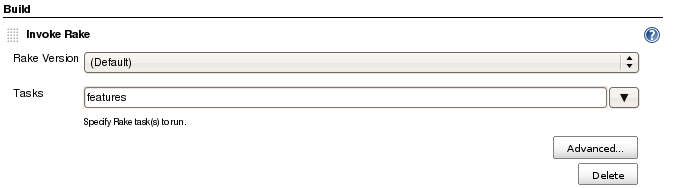
We’re almost done, now we just need to tell Hudson to kick off a rake features after grabbing updates. Click the Add build step drop-down menu and select Invoke Rake and just type features into the Tasks input box.

Invoke Rake Build Step

Now let’s set Gitosis up to trigger your build upon code checkin. Add this line to /srv/git/repositories/robot.git/hooks/post-receive, replace pass and secret with whatever you used for the gitosis user password and the build trigger token:

/usr/bin/curl -u gitosis:pass http://localhost/hudson/job/robot/build?token=secret

Then set file permissions on post-receive and post-update:

chmod 755 /srv/git/repositories/robot.git/hooks/post-update
chmod 755 /srv/git/repositories/robot.git/hooks/post-receive

That’s it. Now Gitosis and Hudson should play nicely together to automatically kick off builds and run your tests whenever you add new code to your project.

Step 9: Check in your code

Back in our robot project directory, we still have our Cucumber test code that we haven’t added yet. Run git status to see these new files. Let’s commit our changes and push it to Gitosis and watch Hudson run the build:

git add .
git commit -a -m "Adding tests."
git push

Now just sit back and watch the build progress on the job page (maybe check out the console output) and prepare for world domination!

Build Successful

Cream of the Crop

November 15, 2008

In a book called Good to Great, Jim Collins and his team of researchers built a list of 1,435 companies and identified the top 11 to determine what makes them tick. One of the principles of effective businesses is that they manage to get “the right people on the bus”. I believe this is especially true in the software industry.

Paul Graham had this to say about the variation in productivity between commoon programmers and truely spectacular ones in his essay Great Hackers:

“Productivity varies in any field, but there are few in which it varies so much. The variation between programmers is so great that it becomes a difference in kind.”

So when you’re hiring, how do you identify a great programmer? Joel Spolsky has written an article The Guerilla Guide to Interviewing and it is a definitive contribution on this topic. The book Programming Interviews Exposed is another fantastic resource. You should definitely read these and apply their wisdom.

I recently fielded a question on stackoverflow (a software development Q&A site) which related to this topic, so I’ve decided to republish my answer to this blog. Here is my interview outline to help you craft specific questions to fire at your candidates. I’ve tried to list these topics in order of importance.


General Intelligence (brain teasers/logic puzzles)

Computer Science Knowledge

Programming Exercises

Tools, Technique and Methodology

Security

Basic Mathematics

  • Numeral systems (convert from one base to another)
  • Probability Theory
  • Distance between two points on Cartesian plane (Pythagorean theorem)
  • Square root (Heron of Alexandria, successive approximation)

Cryptography

  • Public key cryptography
  • Symmetric-key cryptography
  • Hash functions
  • Cryptographic protocols (secret sharing, zero-knowledge proofs)

Discrete Mathematics

  • Logic
  • Set theory
  • Graph theory
  • Information theory
  • Combinatorics
  • Proofs (like existence of irrational numbers, infinite primes)

Anyone has conducted a significant amount of interviews in this industry knows that the majority of potential recruits won’t last through the first 30 minutes of the interview, so much of this list will be unnecessary most of the time. Before you dismiss my more complex topics as overkill, just keep in mind how expensive and emotionally taxing it can be to recognize that you made a poor hiring decision and to later correct it. Good luck in building your team of awesome developers!

The Virtues of Version Control

November 13, 2008

“History is the version of past events that people have decided to agree upon.” — Napolean Bonaparte

It’s always a good idea to maintain a network of colleagues that you can call on for advice when you need it. Recently a friend and I were discussing our respective software projects, and I started asking him questions about his methodology. I asked if he was making use of any continuous integration systems, like Hudson or CruiseControl.rb. He wasn’t. I asked him if he had used any tools for coverage analysis, like rcov or NCover. Neither was he doing any similarity analysis (Simian) to identify code violating the DRY principle. I asked him what he was using for TDD/BDD (check out Cucumber), and he replied that he wasn’t doing any.

Many software teams I’ve encountered (or even been a part of) have ignored these tools. This isn’t terribly uncommon. Finally I ask him, “are you even doing any version control?”. He was not.

I found this to be very surprising, because my buddy has been working on his project for the better part of a year. He hopes to productize his software and take it to market. It’s apparently a fairly mature code base, and yet it is not under the safe watch of any versioning system. It’s shocking to me, because here we are in the year 2008. Today’s software engineering tools are more powerful than ever before, but to a large extent they go unused. Why is this?

With regards to versioning, my friend has several options. Traditionalists are still using CVS, and Subversion is still quite popular. Microsoft has its line in the water with SourceSafe, which I think has been integrated into TeamSystem, but I’m not quite sure. Even some of the strongest open source advocates I know readily plop down cash for Perforce, they say it’s THAT good. There’s new entrants to the arena all of the time, like Eric Sink‘s SourceGear. Linus Torvalds uses git to help manage the development of the Linux kernel.

My buddy’s reason for not using any of them? “I’m the only person working on the code. Why would I need to version it?”

I believe this is the most common reason for not using a versioning system — people just don’t know when the project is established enough to merit using one. Many less experienced developers feel that the right time to start using version control is when there are multiple developers touching the codebase. While this would certainly be a good reason (and I can’t imagine many successful teams of developers not using versioning), it’s flawed reasoning that the lone coder working in isolation doesn’t benefit from the virtues of version control. My take on it is that you should be using version control as soon as you have code that you care about enough that you would be disappointed to lose it. That’s when it’s important enough to version it.

All of this of course inspired me to climb up on my soapbox and preach about the many reasons for versioning your software. So here are my Top 10 reasons for using a version control system:

  1. Never again suffer from the confusion of juggling multiple versions of your codebase by hand.
  2. Provides a single source for backups.
  3. Multiple developers easily work against the same code base.
  4. Branches are easily managed with version control. Sometimes you want to experiment and take the project in a whole new direction.
  5. Commits can reference ticket numbers or bug ids so that developers can easily answer the question “when did we fix that bug?”.
  6. Easily diff new versions against old ones to pinpoint changes.
  7. Easily integrate with a web tool like Redmine to provide project statistics at a glance.
  8. Plays a key role in continuous integration systems.
  9. No real software engineer or manager will take your project seriously unless it’s under version control.
  10. Develop with impunity. With version control you’re like a trapeze artist flying worry-free over a safety net.
  11. For these reasons, I believe that just after the compiler/interpreter and debugger, a versioning system is the most useful weapon in the software engineer’s arsenal. If your project isn’t under version control yet, what are you waiting for? Here’s a nice tutorial and a cheat sheet for git to help you get started. Once you’re up and running, you might want to check out Gitosis (do it yourself) or github (managed hosting) to share your repository with the world.

Book Report: Tribes

November 12, 2008

I recently finished reading Seth Godin’s Tribes. It’s a great little book describing the effect that the internet and social media has had on empowering the individual. We’ve seen this effect in business, technology, and entertainment. It is now extremely easy for one person with a good idea to get it front of the community. To get it the attention that it deserves.

Tribes Book Cover

This book really got me thinking. What tribes do I belong to? We’ve heard it said “Do what you love, and you’ll never work a day in your life” and “Follow your bliss”. I love building elegant systems — especially software. I want to hear from you if you share this passion. I want to trade ideas with you about the best way to do that. That’s our tribe.

Over the course of maintaining this blog, I expect most of my posts to relate to the following 4 assertions:

  • Good software makes users lives better.
  • Building good software is hard but it can be easier.
  • Happy developers build good software.
  • Happy developers use powerful tools.

What is your passion? What is your tribe?

So Far Away

November 10, 2008

Everything is going global. This goes double for our industry, where there are no shipping costs involved in transporting raw materials. With several sites like RentACoder, 99designs and GetAFreelancer it is easier than ever to find talented programmers and designers from around the world that are ready to help you tackle your project. Thomas L. Friedman analyzes the effect of this 21st century phenomenon in his bestseller The World Is Flat. As software continues to become a commodity, here are 10 tips to using this new model of commerce:

  1. Be explicit in your requirements
  2. They say “experience is the best teacher”. In my experience, the most successful outsourcing jobs have been the ones where the requirements were communicated to the contractor very clearly. Any time you leave it up to the programmer/designer to exercise some creativity you run the risk of receiving work which is not quite what you had hoped for. This can be disastrous in software, where interfaces need to be well-documented and quite precise. Document your requirements well or don’t be surprised when you receive deliverables that are unusable.

  3. Keep in constant contact
  4. One big problem in outsourcing is communication. Compounded by language barriers, this can be a huge problem for longer-running projects. Use instant messaging, wikis, or good old fashioned phone calls to stay in touch with your contractors. Be sure to keep in touch too, even after the project is finished. It’s pretty likely that you’ll want to bring in someone that you’ve worked with well in the past on a new project, or that you’ll need to make some changes to the original design.

  5. Be selective
  6. Most outsourcing sites offer a ratings and feedback system so that it’s easy for you to evaluate avaiable freelancers. Does this person have a track record of delivering on time? Are you selecting someone who has experience working on many projects in the past, or is he a relative new-comer to this? Be sure to ask for code samples, portfolios, or links to personal websites and blogs.

  7. Ensure that payment is commensurate with local compensation expectations
  8. When negotiating, make sure to compensate for differences in local economies. Finding cheap labor by leveraging economies of scale is probably the biggest reason to explore outsourcing. Find out where your contractor lives and find out what the local salary average is in his area. One great reference for this is the CIA World Factbook. Using a currency exchange calculator like XE will help to translate these figures to local currency.

  9. Test thoroughly before releasing funds
  10. Ideally you should have a test plan in mind before your contractor delivers the work. Run through it and be sure that the code delivered to you works as promised.

  11. Integrate contractors into your workflow
  12. It doesn’t do you any good if it takes more effort to manage your virtual workforce than it would take you to do the work yourself. If you’re not already using project management systems like version control and issue tracking systems, now would be a good time to consider implementing them. Be sure to grant your workers the minimum access required to do the job. I recently invited a Ukrainian programmer to participate on our project by setting up a sub-project on our Redmine issue tracking system and creating a git-shell for him to check his revisions into our repository. If you’re not up for running these systems on your own servers then checkout managed solutions like Basecamp.

  13. Agree on non-disclosure and ownership
  14. This is valuable intellectual property and you need to be sure that your contractor agrees on who owns the rights to work product once the job is complete. In a similar vein, be sure that your contractor isn’t using any 3rd party code or clip art unless it is licensed appropriately for your project. Use your best judgement to decide whether or not this agreement needs to be legally-binding by contract.

  15. Don’t outsource your secrets
  16. A valid fear of outsourcing in IT is that contractors may take work product and offer them to your competition. Make sure that your most valuable code is built in-house by staff members that you know and trust. If this isn’t an option for you then at least consider breaking the project up into manageable sub-projects which can be built separately by multiple contractors. The government uses this model for top secret projects all the time.

  17. Ask for documentation
  18. The lion’s share of software cost comes not from initial development but from ongoing maintenance. Make sure your contractors are delivering documentation detailing their design decisions to mitigate this factor.

  19. Back it up
  20. Nothing is more frustrating then paying for a piece of code and not being able to find it when you need it. This can happen easily when there are several interdependent modules of a system which are being developed simultaneously. Some outsourcing sites keep a copy of the work product on their website for your download long after project completion, but just to be safe it’s a good idea to copy it to a thumb drive, burn it to disc, copy it to a virtual (web) drive, or email it to yourself.

Drowning in Bits

November 5, 2008

Building good software is hard. That’s because it’s usually a huge moving target. By the time you’re ready to ship (or launch, depending on what you’re developing) you almost never end up with what you set out to build. New ideas pop up during development and you start to identify the importance of features that you never dreamed your customers would ever need.

Add to this the fact that technology seems to be evolving at an accelerating pace. Before you even have your beta version ready, the technology stack (operating system, database, programming language, application server, etc.) that you’ve selected with such confidence no matter feels like it is the best choice.

It’s easy to feel overwhelmed to the point that you want to give up. There’s a certain comfort in it even. Go ahead. Throw your hands up in the air and just give up. Feels good doesn’t it?

Leave the work behind you and just imagine yourself floating on a raft. Out here in the ocean you’re miles away from ringing cell phones and a never ending stream of email. A soft breeze blows over you keeping your skin cool from the sun’s warm rays. The sound of calm waves is the only thing you hear now, and it’s so easy now to clear your mind and focus on just being.

Now snap back to reality, because there are bills to pay! Hopefully that last little paragraph was a nice hypnotic mini-vacation from your otherwise stressful day though. And that’s the point. The first thing to do is just to calm down. Unless you’re writing nuclear weapon management code the world is not going to end if you don’t deliver, so just take a step back for a moment and put things in perspective.

Staying calm is important, but it’s only going to go so far in helping you to be productive. What’s really going to help you to work at your most effective level is time management and prioritization. Start thinking about all of the things you’re wasting your time on needlessly. Do you watch too much TV? Do you have bad habits that you need to work on? Keep a diary for a few days and document how you’re spending your time. If you’re the forgetful type, set a timer to remind yourself to take note of what you’re doing every half hour or so. You should start to notice some less productive activities that you can focus on minimizing. This obviously won’t work if you change your behavior because you know that you’re going to have to review it later — but if that’s what you need in order to get things done, go for it.

Now that you’ve managed to free up more hours in your day, it’s time to focus on what to do with them. In The 7 Habits of Highly Effective People, Covey introduces a system whereby you draw a two-by-two grid. This will leave you with four quadrants, which he suggests you categorize all of your tasks based on their importance and their urgency. Now you know where to focus — urgent and important tasks first. If your house is on fire, getting out of there is definitely urgent and important. If your electric bill is due today and you need to pay it or your service gets cut off, that’s pretty urgent too but it’s not nearly as important as fleeing from a burning house. Maybe those are bad examples in tandem, because I guess paying your electric bill isn’t so important if your house just burned to the ground. That does bring up the point of dependency though. You also want to be sure that you identify any dependencies that your tasks have on other dependencies.

Many project management tools will help you to do this. Redmond gave us Microsoft Project which is loved by project managers and loathed by programmers the world over. In our office we’ve recently implemented a ruby-based project management and bug tracking system called Redmine which I have really enjoyed using.

Finally, I think one of the things you can do that will make the biggest impact is just to do it. Buckle down for one or two days and just prove to yourself that you can do more than anyone would think was possible. You’ll feel like a superhero after you do, and this will do wonders for your motivation and keep you energized to keep delivering. So stop drowning in that sea of bits and get on the raft.

Software and Spellbooks

October 29, 2008

Software is magical. I’ve felt this way about it for as long as I’ve known what software was.

As a kid, playing video games with my older brother was my favorite thing to do. I remember sneaking out of our bedroom and staying up late at night to play games together. We had our first gaming system when I was 5 years old and I just loved it. I didn’t understand it, but I loved it. I didn’t even know that I didn’t understand it, I just played with it like I played with any of my other toys — trucks, squirt guns, whatever.

When I got a little bit older all of that changed. I was maybe 8 or 9 years old and my brother found a book on BASIC from the public library. It described a language that you could use to talk to a computer — to tell it to do things, to give it orders. For me this was the missing link. It was in that moment that I realized that this is how our video games were created. So naturally, we set out to build our own game. There was one problem though. We didn’t have a computer. Fueled with the power of youthful passion, that didn’t stop us from trying. I remember filling pages and pages with GOTOs, PRINTs and INPUTs. Unfortunately we never shipped that first game, but we did learn the ins and outs of that language pretty well.

Our industry is unlike most others in that the fruit of our labor is ethereal. You can’t reach out and touch software. Sure you can copy it to disk, transfer it over wires or print it out on paper, but the software isn’t the magnetic disk or the dead tree. As the soul is to the body, software is to hardware. This is why I think software is magical.

In the MIT Computer Science program first year freshman are introduced to programming through a language called LISP with a course called the Structure and Interpretation of Computer Programs. In this clip, Hal Abelson is giving the first lecture in this course where he says “Computer science is a terrible name for this business. First of all it’s not a science. It might be engineering or it might be art. We’ll actually see that so-called computer science also has a lot in common with magic.”

“Magic? Real magic? I thought we all stopped believe in magic in grade school.” I hear some of you say.

Some of us never stopped believing. They call us programmers. The reason we believe in magic is that we live it every day. It is a profession where our creations are only limited by our imagination (well, ok, that and the Halting Problem). We have tools but no raw materials. It is a purely intellectual pursuit with measurable results.

If you’re good at it you create something beautiful and make billions of dollars. If you suck but you’re lucky then your software doesn’t run at all. If you’re terribly unlucky your code runs as expected long enough to lull you into a false sense of security and then it suddenly fails or behaves in some manner you didn’t expect. Sometimes with drastic results. I remember working at my first startup in 1999. I was writing some code to send mass amounts of emails to customers that had opted-in to our mailing list. The program was run from the command line and took two files as input — the customer email list and the message to be sent out. Obviously I hadn’t tested it thoroughly enough before running it, because one small bug later and we’re sending out our entire email list to everyone on that list. This is what can happen when you don’t take great care when casting your spells.

First!

October 27, 2008

Ok, I’m not gonna lie.  I’ve tried this blogging thing on multiple occasions in the past.  But really, I think I’ve finally got the foundation set up for a blog that I’ll actually enjoy maintaining.  Part of the problem has been finding the right platform — my first attempt at blogging was probably with LiveJournal back in 2001 or so. Since then I’ve tried multiple platforms such as rails-based Typo and Mephisto. They’re all well and good and everything, but if you’re anything like me, maintaining the platform will suck the life right out of you.

So here we go again. This time I’m drinking the WordPress kool-aid and I don’t feel the least bit bad about it. Who cares if it’s implemented in PHP? I used to. Not anymore. It’s about simplicity, right? The whole point is to document history and share information. Oh, and self-promote yourself shamelessly of course. Who wants to bother with the backend? Nope, not me.

It sure is ugly. I have a plan for that though. A younger me would have spent his next few weeks wrestling with Dreamweaver and Photoshop trying to work out something somewhat presentable. This time around though I figure I’ll just leave it to the professionals and post RFPs on RentACoder and 99 Designs.

One big challenge was just finding a name for the blog that was brandable. I was stuck on that one for a while, then finally had the idea to go through The Jargon File running massive amounts of WHOIS lookups. Seeing as how I plan on discussing the complexities of managing and developing technology, I think I’ve finally found something both memorable and fitting.

So with nothing further, welcome to Software Bloat.


Design a site like this with WordPress.com
Get started